

What iPhone Duo teaches us about the next generation of adaptive apps
Don't design for iPhone Duo. Design for available space.
Apple’s first foldable iPhone will be available October 23, starting at $1,999 in the U.S. It has a 5.4-inch outer display, a 7.6-inch inner display and, for developers, a new set of SwiftUI APIs in the iOS 27.1 SDK.
The reflex is predictable: “How do I make my app support it?”
It’s a reasonable question. It’s also the wrong starting point.
The real story isn’t the extra screen. It’s that Duo makes an old assumption harder to defend: that an app’s interface should be defined by the device it runs on.
For years, we’ve built layouts around widths, orientations, breakpoints and device categories. A new device arrives, and we add another condition. Another layout. Another exception. Another if. Eventually the architecture stops describing the product and starts describing the hardware.
Duo exposes that problem. It also suggests a better question: What environment has my app been given?
The device shouldn’t be the abstraction
A genuinely adaptive interface needs to understand:
- How much space is available, and which regions are usable.
- Which content is essential, and which benefits from being visible together.
- Which input methods are available.
- What the user is trying to accomplish.
That's a different model from maintaining an iPhone layout, a Duo layout, an iPad layout and a Mac layout. You build one system that produces the right composition from the environment it receives. That also aligns with Apple's own guidance for Duo: design across a continuum of available space rather than around fixed dimensions or device-specific breakpoints.
SwiftUI describes relationships, not screens
SwiftUI is usually described as a framework for building interfaces. That undersells it.
SwiftUI describes relationships between content, space and interaction.
A VStack doesn't mean portrait. An HStack doesn't mean landscape. NavigationSplitView doesn't mean iPad. When the environment changes, those relationships can change without turning the app into a different product.
Duo widens the range of possible compositions. That's where ArrangementView comes in.
ArrangementView makes composition explicit
The syntax matters less than the idea. Consider the traditional approach (pseudo-code):
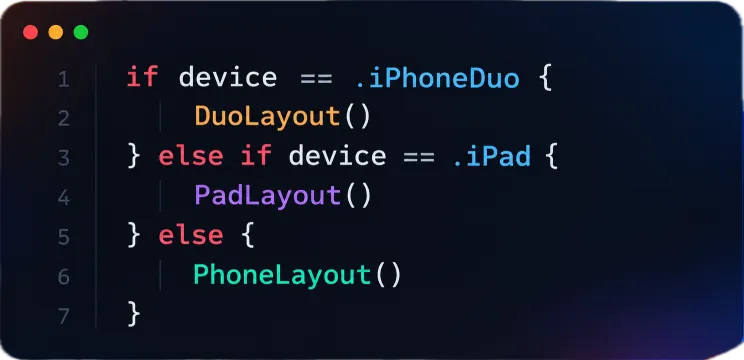
The device drives the composition. Now compare:
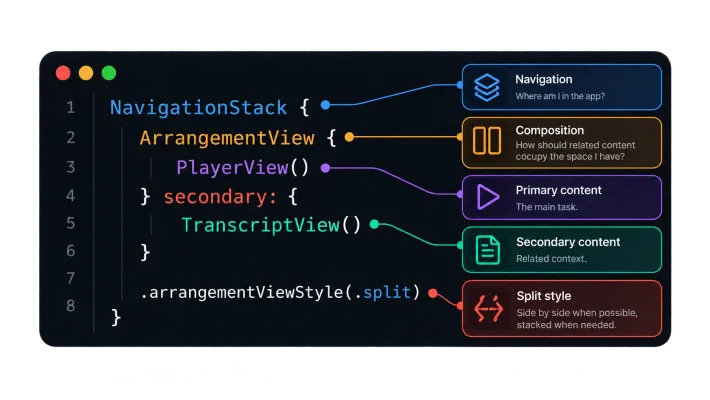
The app isn't saying "I'm on a Duo, so I need two columns." It's saying "I have primary content and related secondary content. Given the current environment, how should they be arranged?"
The layout becomes a function of context, not hardware.
ArrangementView offers built-in split and overlay configurations.
The .split style divides the available space between the primary and secondary views, splitting horizontally when the view is wider than it is tall and vertically when it is taller than it is wide.
You can constrain the supported axes when the product requires a particular relationship. The .overlay style layers the views and can adapt that relationship as the environment changes. For custom layouts, developers can conform to ArrangementViewStyle.
Availability. ArrangementView and the hinge APIs discussed below are part of the iOS 27.1 SDK. At the time of writing they are still pre-release, so verify signatures against the final Xcode release before you ship.
It's a small API with a large implication: composition gets a first-class place in your architecture.
A concrete example: video review
The composition changes. The state does not.
Concurrency isolation and spatial composition solve different problems. \@MainActor answers who owns UI state. An actor answers who owns shared mutable state. ArrangementView answers how independent pieces of the interface relate in space.
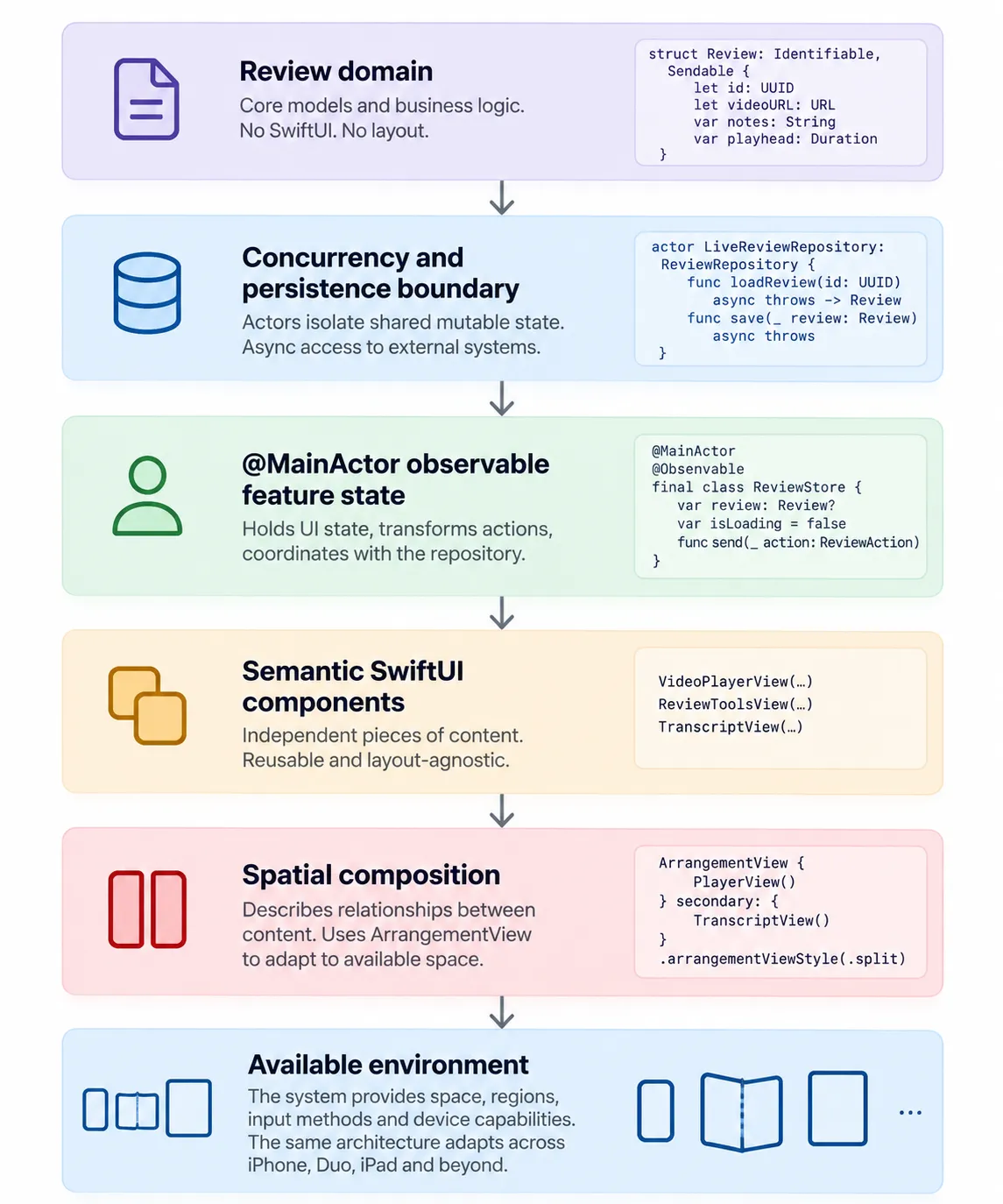
Available environment
That is the architectural boundary I want to preserve:
The test never asks whether the app is running on an iPhone, iPad, or Duo. It verifies the feature's behavior independently from its composition.
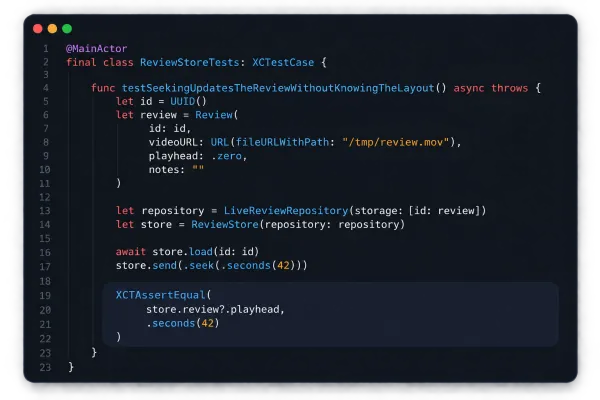
This also makes the feature straightforward to test.
Neither component knows whether it is displayed in a sidebar, a sheet, or an arrangement. They expose semantic content and user intent; composition decides where that content belongs.
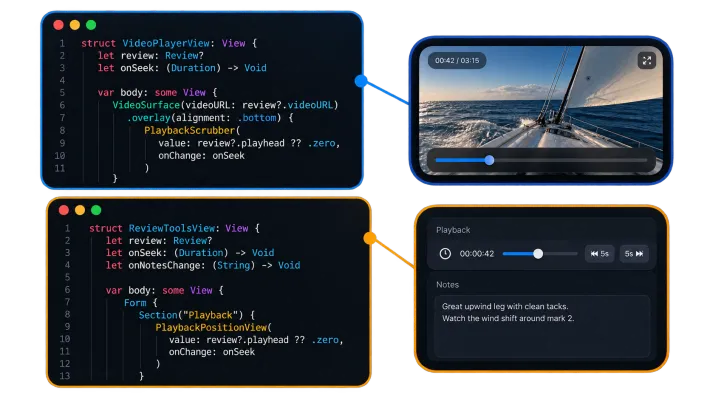
The feature views remain location-agnostic.
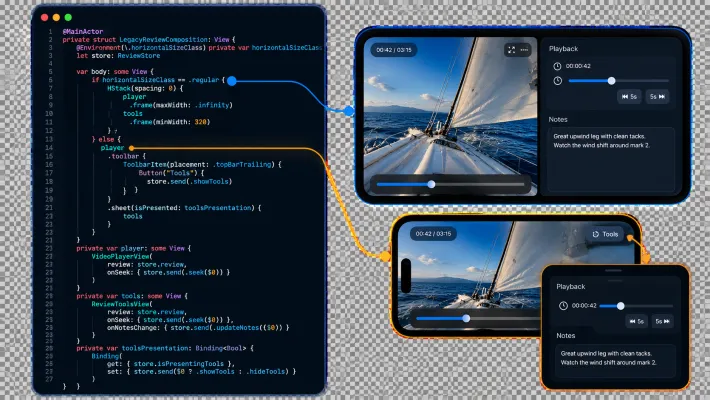
The important abstraction is not iPhone, iPad, or Duo. It is the relationship between primary work and supporting context. Apple documents ArrangementView as an adaptive layout that responds to environmental inputs such as size classes, aspect ratio, and active division regions. The split style can be constrained to particular axes.
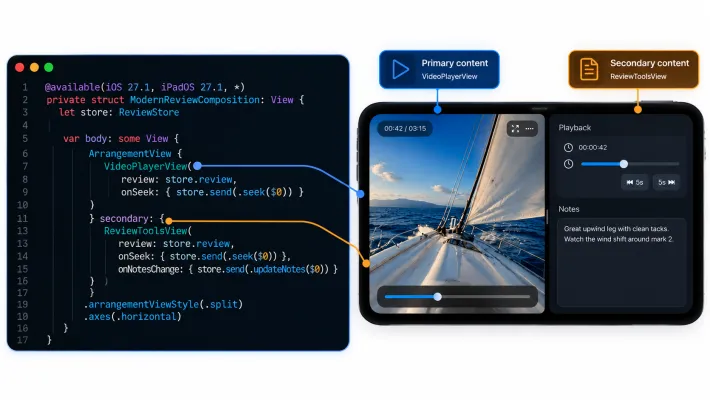
The modern composition expresses a spatial relationship between two feature surfaces. The environment determines how that relationship is rendered—not the device name.
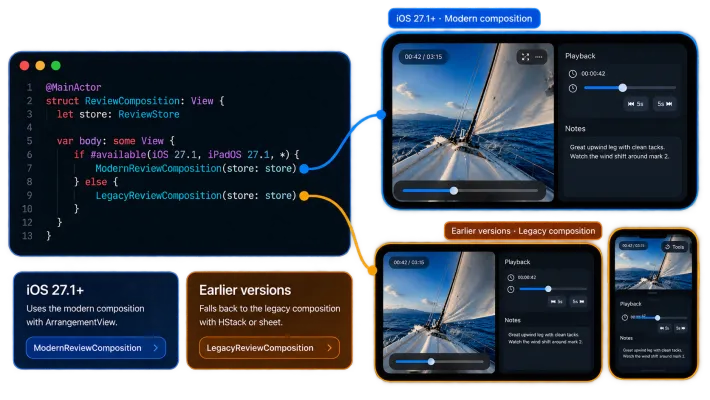
The screen owns the lifetime of the observable store. It still does not decide whether the tools belong beside the video, over it, or in another presentation.
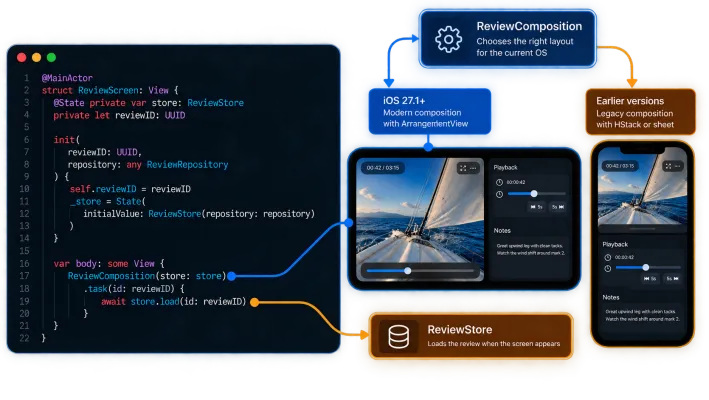
Now the UI state is explicitly isolated to the main actor. Observation lets SwiftUI track the properties a view actually reads, while the repository remains an independent concurrency boundary.
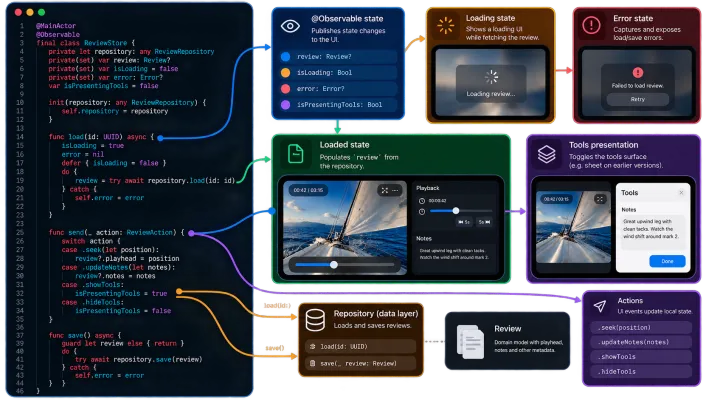
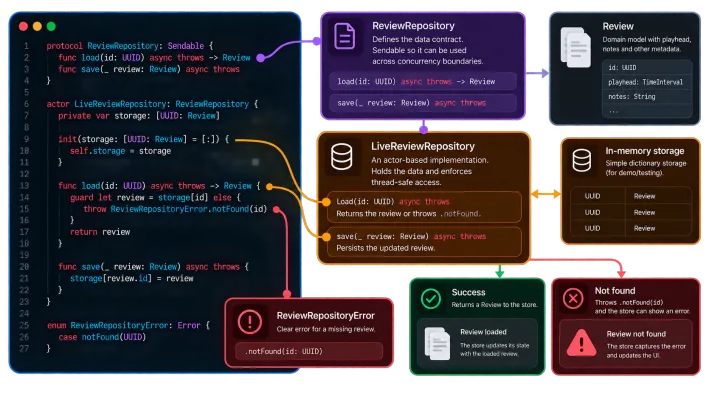
The repository is an actor because it owns mutable storage. That is a concurrency boundary, not a UI abstraction.
The domain model knows nothing about SwiftUI, devices, size classes, or arrangements.
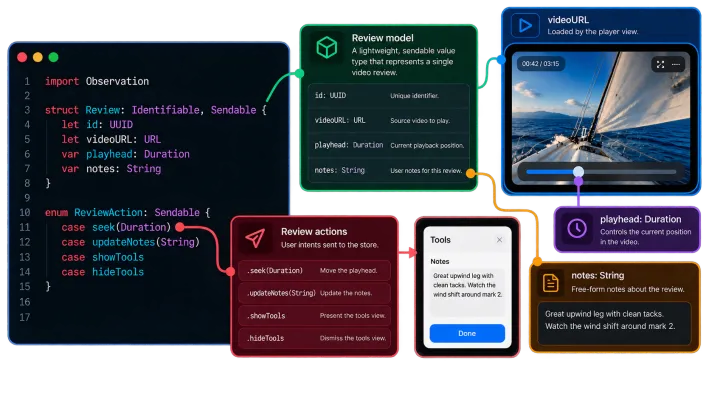
The interesting part is not the video player itself. It is the boundary between application state, feature behavior, and spatial composition.
Take a professional video-review app. The primary task is reviewing the video. The supporting context is the timeline, metadata and notes.
The catch
When a split arrangement can’t split, ArrangementView presents a single view. That’s not a bug. It’s the consequence of respecting the available space.
But it creates a product question: if the secondary content isn’t visible, how does the user reach it? Maybe an overlay. Maybe a sheet. Maybe a tab. Maybe it isn’t important enough to expose at all. None of those are layout decisions. They’re product decisions.
That’s one reason I like this API. It doesn’t pretend adaptive UI is solved because two views can sit side by side. It forces you to think about information hierarchy.
Two constraints to know before you move from demo to production. ArrangementView provides no navigation infrastructure, so keep navigation outside it and don’t nest a
NavigationSplitView inside. And don’t place it inside a List or ScrollView.
More space means more relationships, not bigger controls
When we get more display area, we tend to make the existing interface larger. That’s rarely what users need.
More space can mean more relationships, not more pixels. A transcript beside a player.
A customer record beside a conversation. A document beside its research. A drawing beside its specifications.
The value of a larger display is often not that content gets bigger. It’s that related content can coexist.
Navigation and arrangement are different problems
One of the easiest ways to over-engineer adaptive UI is to make navigation and composition solve the same problem. They should not.
Navigation answers: Where am I in the application?
Composition answers: How should related pieces of this feature occupy the space I have?
A real feature might therefore look like this:
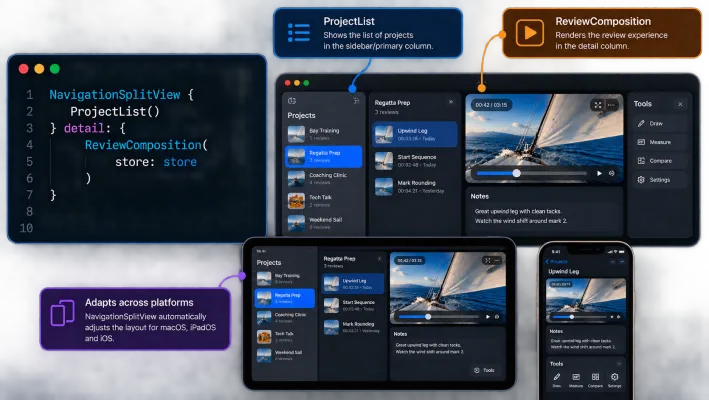
NavigationSplitView owns application navigation. ReviewComposition owns the spatial relationship between the video and its supporting tools. Keeping those concerns separate means a change in one does not force a redesign of the other.
Not everything should be adaptive
Adaptive architecture does not mean maximizing the amount of UI visible at every size. Some relationships are part of the product itself. If a timeline must remain associated with
playback, that relationship should not disappear simply because more space is available. The goal is not more UI. The goal is the right relationships for the context. Adaptation should preserve product semantics while changing composition, not replace
product semantics with a collection of responsive layouts.
Why Sendable matters at the boundary
The repository actor and the @MainActor feature store are deliberately separate concurrency domains. The values crossing that boundary should make that fact explicit
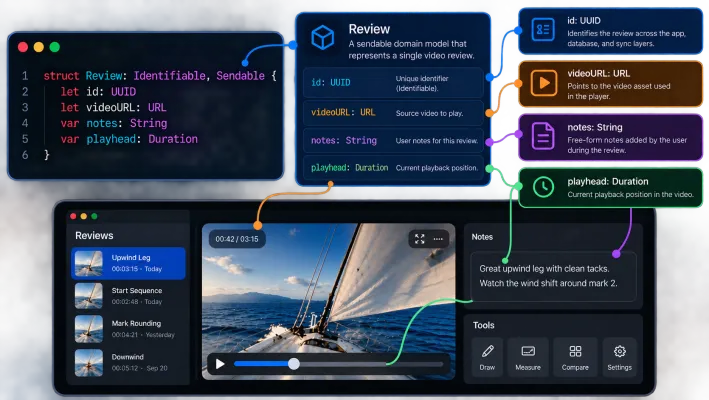
Sendable is not decoration here. It lets Swift’s concurrency model participate in enforcing the architecture rather than relying entirely on convention.
Test the architecture, not the device
The most useful tests for this feature do not assert that a particular device gets a particular layout. They test the boundaries we actually own.
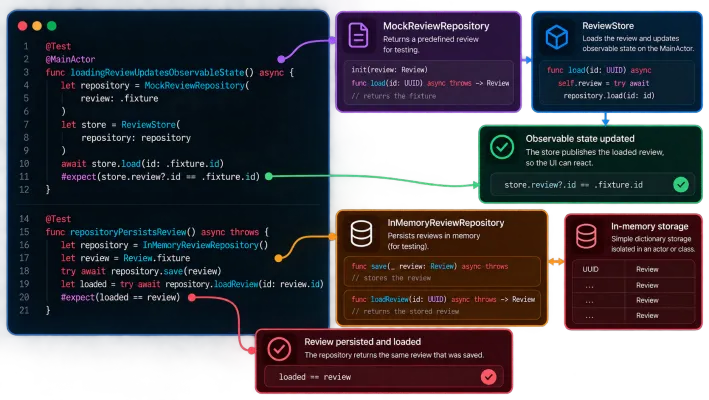
Neither test knows whether the application is running on an iPhone, iPad, or Duo. The first verifies the Main Actor feature boundary. The second verifies the actor-backed data boundary. Spatial behavior can then be tested at the composition layer without coupling the domain tests to hardware.
The architecture in one picture
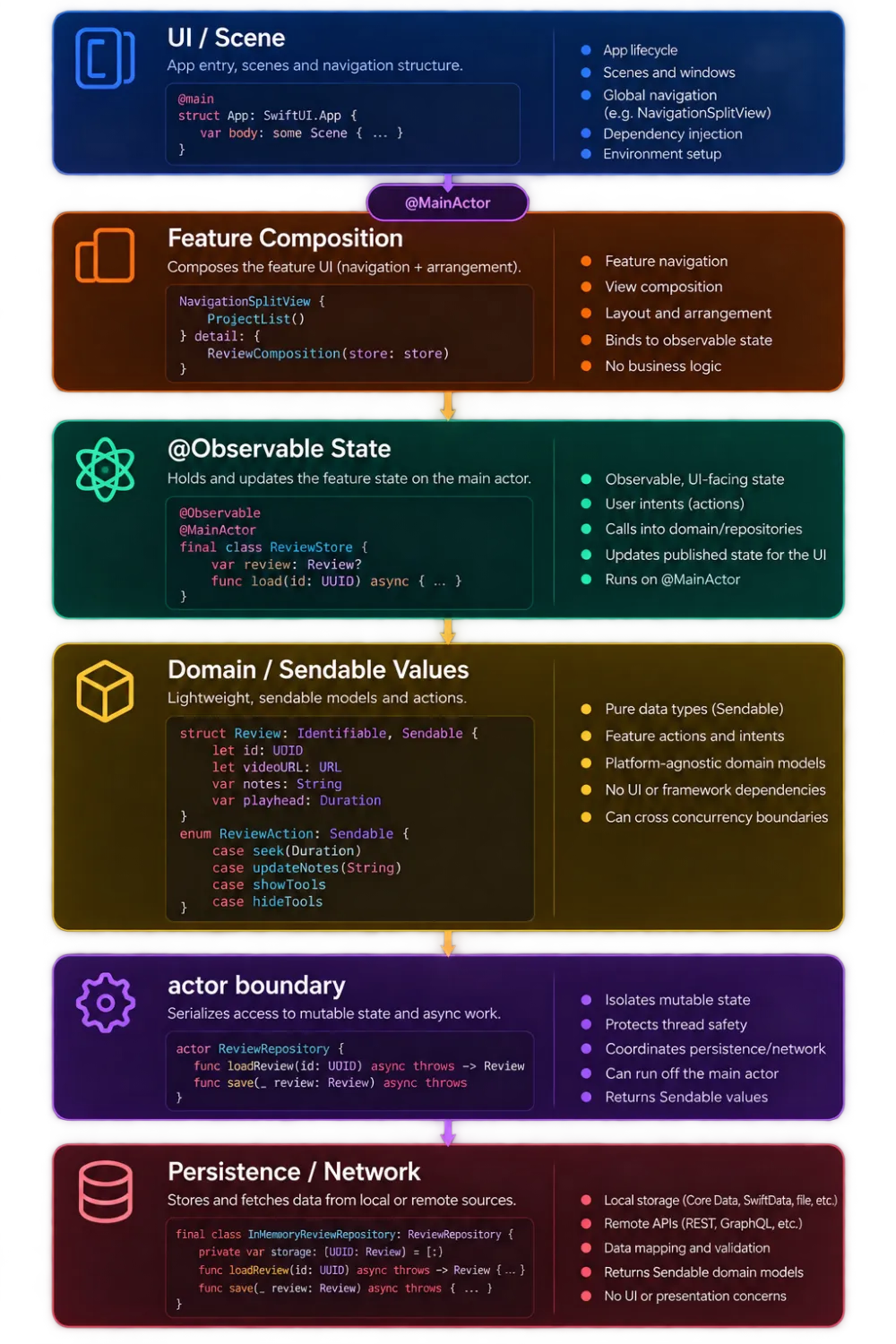
The interesting part is not that SwiftUI can adapt. It is that the architecture can adapt without changing what the application means.
The professional opportunity may be even more interesting
Consumer apps are the obvious place to demonstrate Duo. Professional software is where the model gets compelling. The pattern is the same each time: work, plus context.
- Doctor: patient record, with history and notes.
- Lawyer: document, with case files and research.
- Architect: drawing, with specifications and measurements.
- Salesperson: opportunity, with CRM history and pricing.
- Field technician: current job, with checklist, camera capture and communication.
These apps don’t need more screens. They need better arrangements of information.
It extends to teams, too. A field worker uses the app through touch and camera. Back at a desk, the same person works with a richer composition. A manager uses the same product as an operational dashboard. Same app, same data, different context, different composition.
At that point, adaptive UI stops being a UI concern. It becomes product architecture.
A pocket workstation?
Some of this is already on Apple’s spec sheet. Apple says iPhone Duo will support Apple Pencil (USB-C) on either display later this year, and its specifications list DisplayPort support.
Beyond that, I’m deliberately not predicting Apple’s roadmap. But the possibility deserves attention. An unfolded Duo on a desk, paired with a Pencil or an external display, occupies an interesting middle ground. Not a Mac replacement. Not just a bigger phone. Something closer to a portable professional workspace.
A doctor may not need a desktop for every task. Neither may a consultant or a salesperson. Sometimes they need their data + their tools + enough space to work.
That suggests the useful distinction isn’t mobile versus desktop. It’s available space + input method + context. The app doesn’t need a different identity in each environment. Its composition changes.
The real payoff is decoupling
This is the part that matters most to me as an engineer. Decouple what the application knows from how it is currently composed.
The domain model shouldn’t care whether the transcript is beside the player. The player shouldn’t care whether the timeline is visible. The document model shouldn’t care whether notes appear as a sidebar or another presentation. Those are compositiondecisions, and composition should be free to respond to the environment. That’s what makes this architectural rather than cosmetic.
ArrangementView makes the idea explicit, but it isn’t alone. NavigationSplitView, ViewThatFits, Layout, size classes, containerRelativeFrame, safe-area APIs and adaptive toolbars all point the same way. They’re not tools for making screenshots look right at different sizes. They express constraints, relationships, priorities and composition.
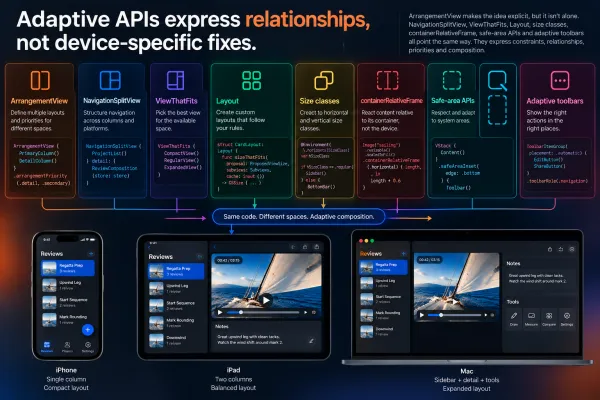
The goal isn’t to eliminate every conditional. It’s to make sure each one represents a meaningful change in the experience, not an arbitrary property of a particular device.
Where the device still matters
The best Duo implementation might contain almost no code that knows what a Duo is. But not zero.
Hinge state can influence interaction. Reserved regions affect where content and effects can safely appear. Camera behavior can shape an experience. The mistake isn’t using device-specific capabilities. The mistake is making them the foundation of your layout architecture.
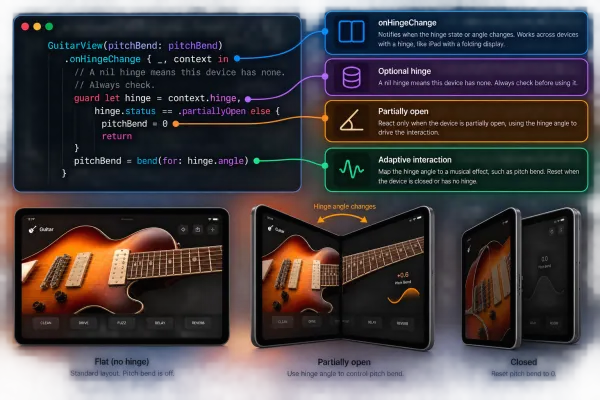
Here the hardware is meaningful: the hinge changes an interaction. And the app still has a graceful fallback on every iPhone without one. Layout follows context. Effects may follow hardware, and must fall back everywhere else.
Where to start
If I were adapting an existing SwiftUI app, I wouldn’t begin with Duo-specific code. I’d begin with an audit.
- Find fixed-width assumptions. Look for centered and fixed-width layouts and ask whether two meaningful regions would serve the content better. Not every screen should become two columns, but every fixed-width assumption should have a reason.
- Let the system own navigation. Prefer NavigationSplitView and adaptive system navigation patterns such as TabView with .sidebarAdaptable over recreating navigation behavior by hand.
- Identify primary and secondary content. Wherever there’s a natural work-plus-context relationship, ask whether ArrangementView expresses it better than another screen.
- Test the uncomfortable configurations. Half width. Asymmetric insets. Transitions. The moment the secondary content disappears. That’s where adaptive architecture proves whether it works.
Stop designing for screens
iPhone Duo isn’t asking us to build another layout. It’s asking us to rethink what a layout is.
Instead of “What screen am I on?”, ask “What space do I have?”
Instead of “Which device is this?”, ask “What can the user accomplish here?”
Instead of “How do I make this fit?”, ask “How should these pieces of information relate in this context?”
That’s why ArrangementView interests me. Not because it solves an iPhone Duo problem, but because it represents a broader shift in how we think about UI architecture.
Don’t design for iPhone Duo. Design for available space.
The best adaptive interface isn’t the one that fits every screen. It’s the one that understands why the space changed.
Swift in Practice is back.
If iPhone Duo is teaching us anything, it’s that the next generation of SwiftUI interfaces may be less about designing screens, and much more about designing relationships.
☕ Enjoying Swift in Practice? It's free and reader-supported. If an edition saved you some debugging time, you can buy me a coffee: https://buymeacoffee.com/swiftinpractice
Originally published as a Swift in Practice edition on LinkedIn. Comments and discussion happen there.